
Vereev brand research hub
Gucci Authentication
Learn how to authenticate Gucci bags using model and era, materials, construction, interior tags, number references, hardware, and Gucci's official NFC Authenticity Tag.
Direct answer
A responsible Gucci review compares the exact model and era across shape, materials, tag construction, number references, hardware, stitching, and official NFC context where supported.
Gucci Authenticity Tag, NFC, and QR Codes ExplainedComplete review
How to approach Gucci authentication
Model, category, and era
Identify the exact bag, size, material, collection, and likely production period because Gucci details change across generations.
Shape, materials, and finishing
Compare proportions, leather or canvas, motif relationships, quilting, lining, stitch paths, edge paint, and component assembly.
Tags, numbers, and hardware
Review the complete interior tag, number format, typography, country wording, zippers, engravings, clasps, and attachment methods.
Official NFC context and photos
Use Gucci's app for supported Authenticity Tags and collect full, clear item photos for everything the tag cannot show.
Photo guide
Photos to take of your Gucci bag
The Vereev app's photo guide for bags lists these 13 angles, and the numbers on the drawing match the list.
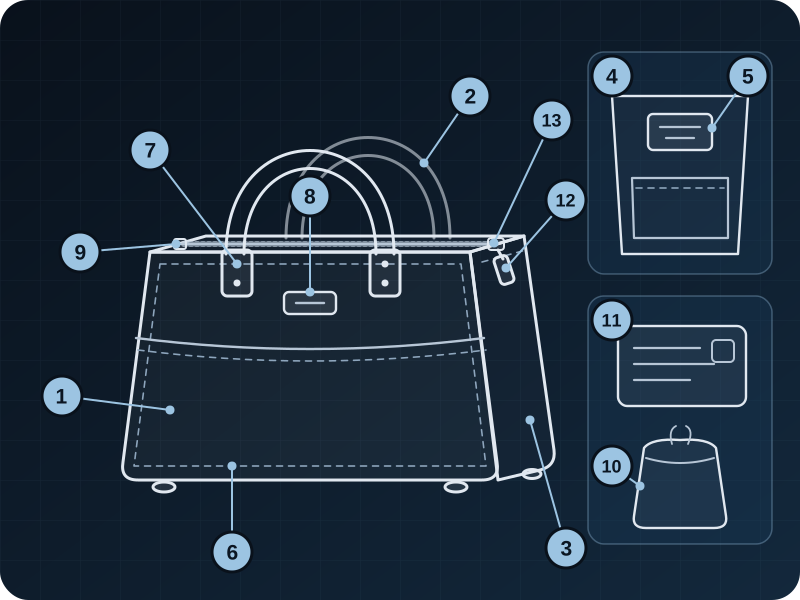
Front Appearance
Show the complete front shape, proportions, logo placement, and material condition.
Back Appearance
Capture the back side so panel alignment, structure, and wear can be compared.
Side Profile
Show side shape, depth, seams, and how the bag holds its form.
Interior
Open the bag and photograph the lining, pockets, interior stamp, and construction.
Tag or Stamp
Capture tags, stamps, serial marks, or date codes in sharp focus.
Detail Close-up
Show stitching, glazing, corners, print alignment, or any detail that helps authentication.
Hardware
Photograph zipper pulls, clasps, buckles, engraving, and metal finish clearly.
Hardware Lettering with Logo
Photograph the hardware lettering and logo straight-on in sharp focus, including engraving depth, typography, spacing, screws, and metal finish.
Zipper Starting Point
Photograph where the zipper begins, including the anchor tab, zipper teeth and tape, surrounding stitching, and nearby construction.
Dust Bag
Include the dust bag, care card, or packaging materials if available.
Authenticity Card
Add cards, receipts, barcodes, or documents that came with the bag.
Zipper Slider (Front)
Photograph the front of the zipper slider in sharp focus, including the opening, metal edges, and surrounding zipper teeth.
Zipper Bottom
Photograph the zipper bottom in sharp focus, including any markings, metal finish, and surrounding zipper teeth.
Follow the same angles in the app
The Vereev app shows a sample photo for each angle when you submit a Gucci bag. Sharp, same-item photos give the reviewer the evidence this page describes; packaging and documents help when you have them.
See the app's 13 sample photos for bagsResearch library
Gucci tools and guides
Complete guide
How to Authenticate a Gucci Bag
Review model and era, shape, materials, logos, tag construction, numbers, hardware, stitching, and NFC context.
Open resourceReference guide
Gucci Serial Numbers: Meaning and Limitations
Understand model and supplier references, common tag placement, era variation, and why no public lookup proves authenticity.
Open resourceOfficial feature explained
Gucci Authenticity Tag, NFC, and QR Codes
Separate Gucci's official NFC feature on selected items from ordinary QR labels and interior number references.
Open resourcePhoto checklist
Designer Bag Authentication Photo Guide
Capture the full item, tags, markings, hardware, stitching, lining, condition, and provenance clearly.
Open resourceRelated brand research
Authentication guides for related brands
Evidence standard
Codes and tags are context, not verdicts
Gucci's official documentation says its NFC Authenticity Tag is available only on selected items and should be read through the Gucci app. Ordinary QR labels and serial references are different systems and do not independently authenticate a product.
Vereev is an independent authentication service and is not affiliated with, endorsed by, or sponsored by Gucci.
Read our research methodology